
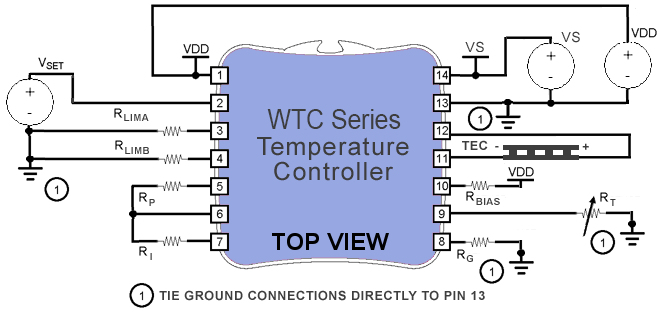
Click on the pin number for a functional description of that pin.
Fill in the data points specific to your application.
- All enabled fields are required.
- Your configuration choices determine which fields are enabled.
- You can use engineering notation (m for 10-3 or u for 10-6) in your entries.
Click on the 'Update Circuit' button to calculate component values and update the schematic for your application.
CAUTION: This calculator does not check internal power dissipation limits. Be sure to use the Safe Operating Area (SOA) calculator
to verify and protect your application.
LEGAL DISCLAIMER:
While reasonable care has
been taken to ensure the accuracy of this simulation, Wavelength
Electronics Inc shall not be liable for any direct, indirect,
special, incidental, or consequential damages, whether based on
contract, tort, or any other legal theory.
 |
|
|
|
| Application Specifications | |||
| Setpoint | 25 | ||
| Heating | 1 | ||
| Cooling | 1 | ||
| Output | Thermoelectric | ||
| Load | fast | ||
| Sensor Gain | 0 | ||
| Sensor | |||
| Bias | 100e-6 | ||
| T1 | 0 | ||
| T2 | 0 | ||
| T3 | 0 | ||
| R1 | 0 | ||
| R2 | 0 | ||
| R3 | 0 | ||
| CAUTION: This calculator does not check internal power dissipation limits. Be sure to use the Safe Operating Area (SOA) calculator to verify and protect your application. |
LEGAL DISCLAIMER: While reasonable care has been taken to ensure the accuracy of this simulation, Wavelength Electronics Inc shall not be liable for any direct, indirect, special, incidental, or consequential damages, whether based on contract, tort, or any other legal theory. |